
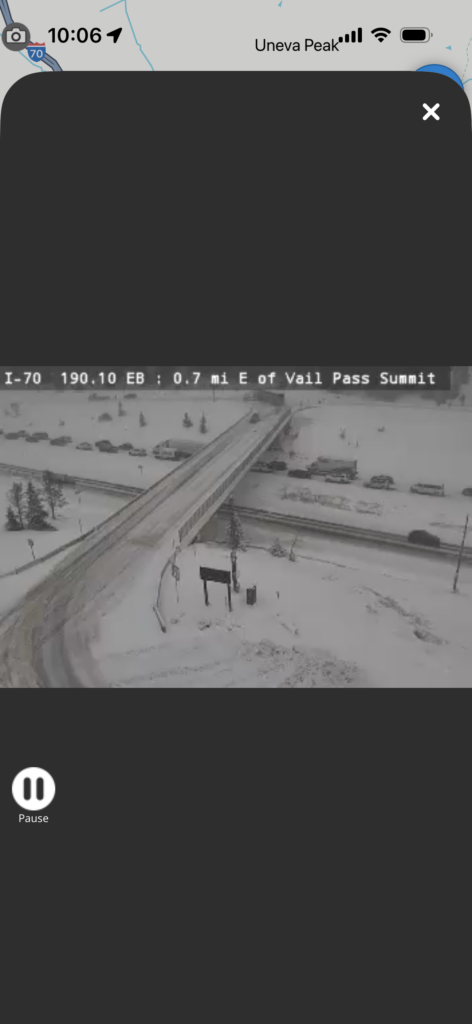
Heading up Interstate 70 for a ski weekend or mountain adventure? It’s easy to assume that if the weather looks fine in Denver, the whole drive will be smooth. But conditions on the I-70 Mountain Corridor can change fast once you climb above the foothills – especially around the Eisenhower-Johnson Memorial Tunnels and Vail Pass.
One minute you’re cruising under blue skies in the Denver metro – the next, snow, wind and icy pavement can make the drive challenging or even dangerous. That’s where CDOT’s live traffic and weather cameras come in: they’re one of the best tools for seeing what’s really happening on the road before you hit the highway.
Why Check the Cameras Before You Travel?
Colorado’s mountain weather can be unpredictable. While Denver may be sunny and calm, winter storms and cold conditions often hit higher elevations hard. Here’s why using the cameras matters:
- Real-time visuals: Instead of guessing what conditions are like at high elevations, you can see them live – from tree line snow to blowing visibility near the tunnels or on Vail Pass.
- Make better decisions: Spotting plows, slick pavement or traffic backups gives you time to adjust your plans – choose a different travel time or prepare for slower driving.
- Expect the unexpected: Even a short burst of snow or wind can slow travel or trigger traction laws and chain requirements. Having eyes on the road helps you anticipate that.
Where to Find the I-70 Mountain Corridor Cameras
CDOT maintains a network of cameras spanning the mountain corridor – from C-470 in the metro area all the way to Vail and beyond – with views of key locations like:
- The lead-up to the Eisenhower-Johnson Tunnels
- Vail Pass and Glenwood Canyon
- Mountain towns like Georgetown, Silverthorne, Frisco and Vail
You can view these real-time cameras via CDOT’s COtrip traveler information system and the direct camera feed for I-70 from C-470 to Palisade.
Plan ahead and see the cameras here: www.codot.gov/travel/i70mountain — this page includes direct links to I-70 cameras and real-time road condition info. (Colorado Department of Transportation)
Pro tip: The cameras refresh often, and while they aren’t always video, frequent snapshots give you an idea of conditions that’s far better than weather reports alone.
Tips for Using Camera Info
Here’s how to make the most of CDOT’s cameras:
- Check before you leave: Look at conditions along your entire route – not just in Denver.
- Watch backups and slowdowns: Cameras near tunnels and mountain passes often show delays before traffic apps do.
- Observe weather trends: Snow, clouds and road surface conditions can give clues about what’s coming next.
- Combine with alerts: Use COtrip.org or the COtrip app for closures, traction law alerts and incident updates.
Planning your I-70 mountain trip isn’t just about checking the forecast – it’s about seeing the road conditions that weather creates. CDOT’s live cameras empower you to make informed choices: leaving earlier or later, packing extra gear or simply choosing a safer day to hit the road.
Don’t let a beautiful morning in Denver fool you – look up the mountain travel conditions and see what’s really ahead. Safe travels!